Podcasts can now be featured on YouTube. You can easily publish your podcast to YouTube from Dovetail whether you already have one or are onboarding one for release.
Prerequisites before starting this process:
• Make sure you’ve created an ad-free feed in Dovetail. This article will guide you through the process. Once you’ve done that, click on the “open URL” button. A new browser window will open that will have the RSS feed with the token in the address bar.
• Your YouTube account must be verified or you won’t be able to submit your RSS feed. You will be instructed to complete a verification process in the middle of the process outlined below if you do not do this. You can find Google’s support article on You Tube account verification here. If you don’t have a YouTube account yet, you can learn how to set one up here.
Once you have your ad free feed and account set up, you’re ready to head to YouTube!
STEP 1: Sign in to your YouTube account and select “YouTube Studio” from the left-side menu.
STEP 2: Mouse over to the “create” button in the upper right corner of the screen and choose “New podcast” from the dropdown menu. Then select “Submit RSS Feed” from the available options.
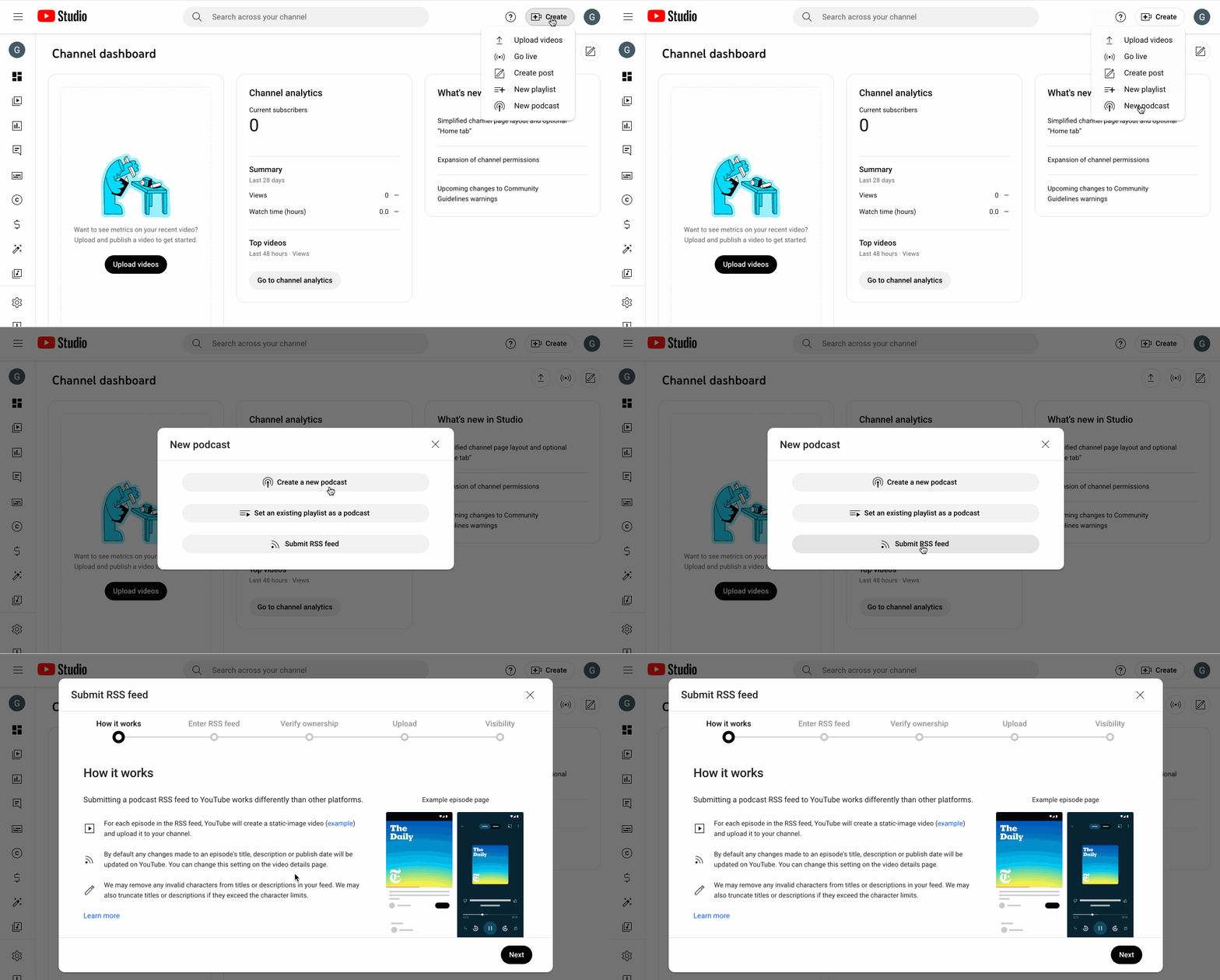
STEP 3: Click “next” to enter your RSS feed in the window. This is where you’ll enter your ad-free feed RSS URL.
STEP 4: You will be guided through verifying ownership of the series via email. Once you’ve done this, you will be asked to select upload preferences. You can opt to upload all episodes from the feed, upload episodes published since a specific date, or upload no old episodes.
NOTE: You can alter the visibility options of your podcast at any time. The options are:
public (viewable and searchable to the general public)
unlisted (not shown to the general public, but can be seen if the link is shared)
private (not viewable or searchable by the general public.)
|
Some things to keep in mind:
|
Congratulations! Your series will now be live on YouTube!
More Google/YouTube specific information and help sections can be found here. If you have any PRX or Dovetail-related questions, you can reach out to us at help@prx.org.